QFE and QNH Altimeter Settings
QFE and QNH Altimeter Settings
Generally it can be said that:
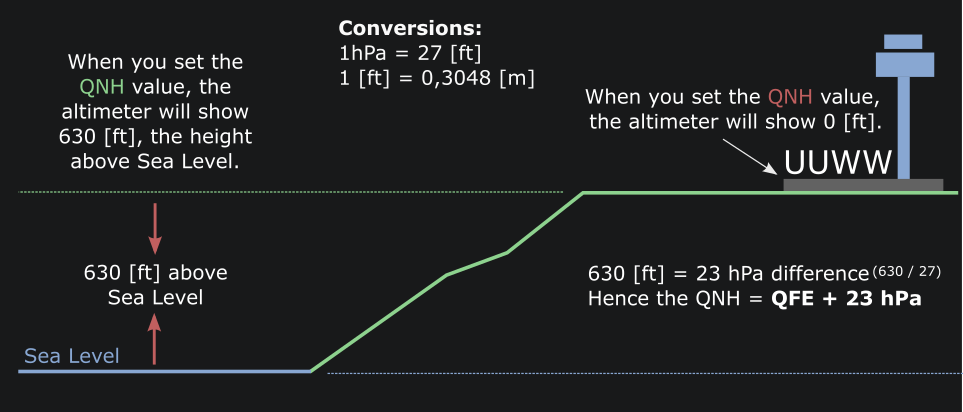
When setting the QFE (FE = Field Elevation) value the altimeter will show 0 feet because it simply shows height above the airfield.
When setting the QNH (NH = Nautical Height) value, the altimeter will show the altitude above mean sea level. So in UUWW, runway 01 it will show approx. 630 feet.
Procedures:
In Russian Airspace at or above transition altitude / height / level the same Flight Levels (FL) in [ft] system is used.
Below transition altitude / height / level the procedure depends on whether or not you can actually set the QFE value in the FCU.
Aircraft that do not have a QFE setting avaible for the altimeters, a conversion of the reported QFE value into the corresponding QNH value has to be made.
In the example we will use the airport UUWW/Vnukovo. The threshold for runway 01 is 630 [ft] above Sea Level.
Example
Lets assume the reported QFE is 997. On Lido charts you might find a published QFE/QNH conversion value. On Jeppesen (Navigraph) you do not. You will need to calculate the QNH value yourself. What you come up with? (Click to open)
Knowing that 1 hPa equals 27 [ft] difference, we take the threshold elevation and divide it by 27.
So: 630 divided by 27 equals a pressure difference (between QNH and QFE) of 23 hPa.
Now we can derive the QNH by adding 23 hPa from the QFE: 997 + 23 = 1020 hPa QNH.
When you set this value in the Altimeters, they will show a value of 630 feet, i.e. The height above MSL.
Practical usage
For Takeoff look in the departure charts for the intial climb value:
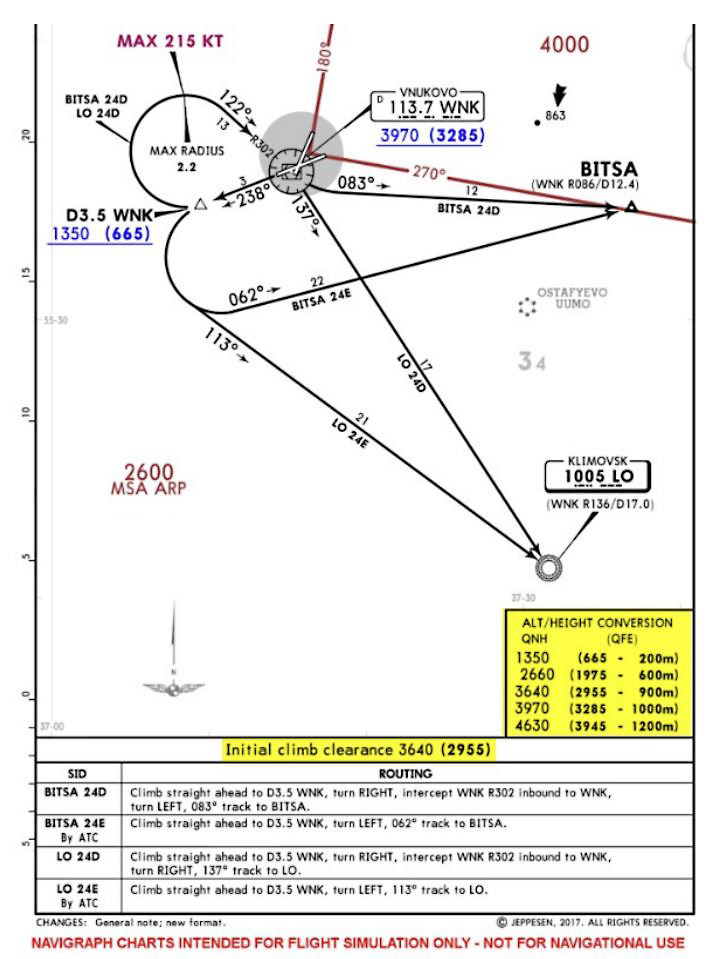
We can see from the chart that the Inital Climb clearance is 900 meters QFE. We still assume we have an aircraft where we can't set QFE on the FCU. So we have set the calculated QNH in the altimeters and then look at the chart alt/height conversion.
There we can see that 900 meters = 3640 feet QNH. So we set 3700 (rounded up) in the FCU Altitude window. This is the initial climb altitude, referenced to QNH.
Example
Let's assume that after our initial call on departure we get instructed to climb to 1200 meters QFE. What value do you need to dial into the FCU Altitude window? (click to open answer)
Of course you know the answer........ 4630 [ft]
The transition altitude is 1200 meters QFE, so once you are cleared above that altitude, you will get a Flight Level value in feet. I.e. „FL 120“.
Approach
Next let's look at an approach into UUWW. We are still in an aircraft without QFE selection on the FCU!
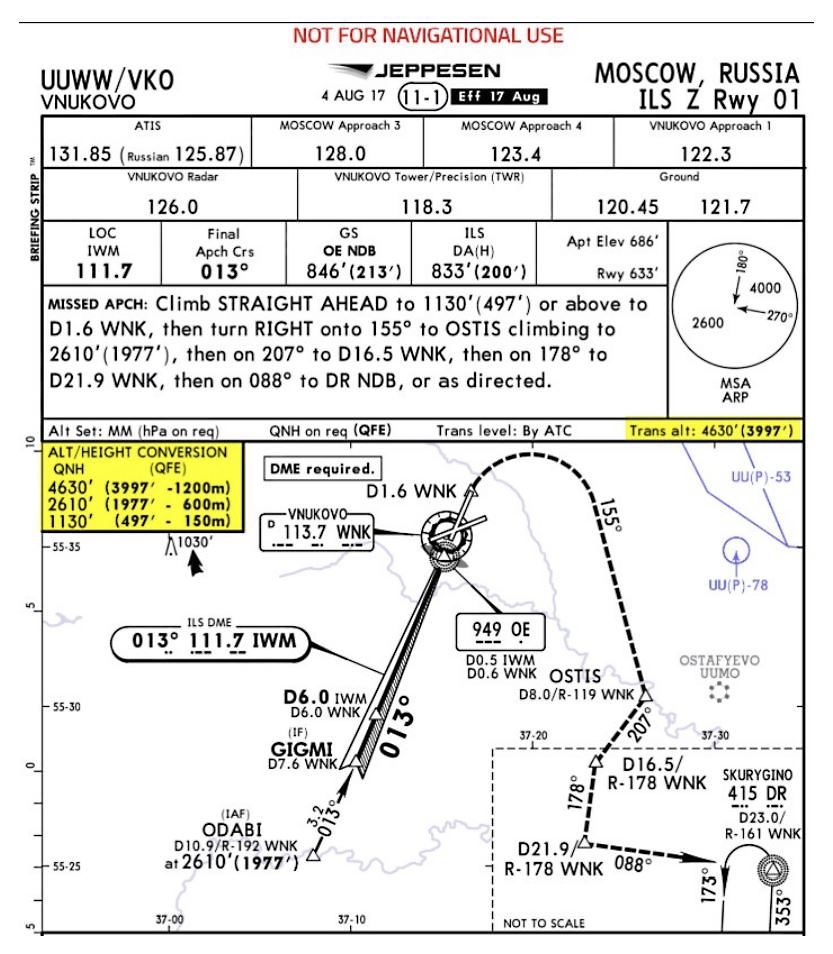
As long as you are above Transition Altitude, you will get normal Flightlevel clearances. I.e. „FL 60“.
Once you get cleared to an Altitude, the values will change to meters QFE! I.e. „descend 600 meters QFE 997“. And then you will set the QNH value (1020 in our example) into the PFD 1 and 2 altimeters. To have a crosscheck reference, you may set the QFE value in the ISIS. That way the ISIS would show approx. 2000 feet when maintaining 600 meters QFE.
In the FCU Altitude window you would set 2700 feet. Also you can press the METRIC ALT Pushbutton next to the Altitude Selector Knob:
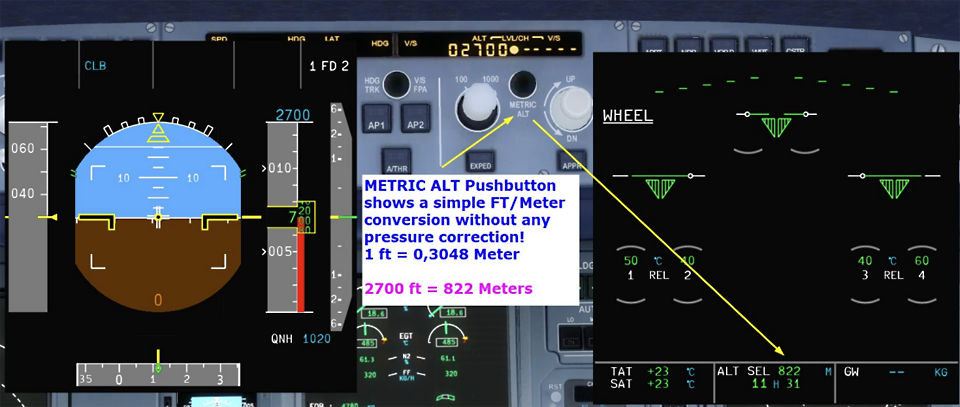
Be aware thought, that the Meter Indication on the SD page shows a simple feet/meter calculation. I.e. Feet divided by 27.
So when setting the QFE in the ISIS, you will have the follwing indications:
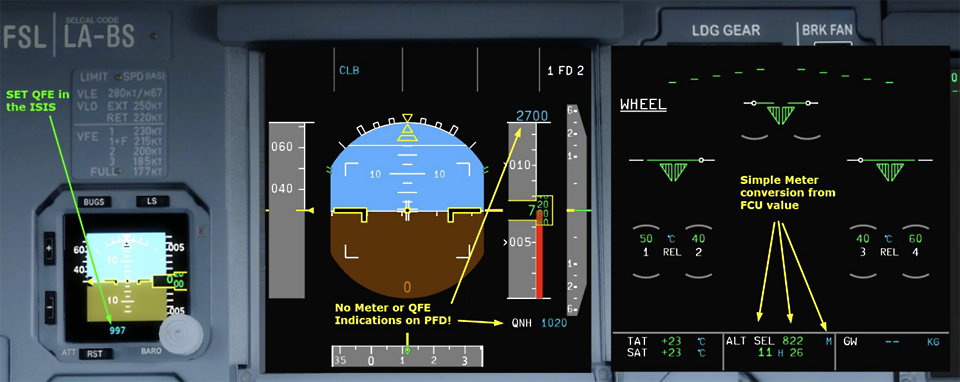
On the ground at the threshold of UUWW runway 01, the ISIS shows 0 feet (QFE) and the PFD altimeters approx. threshold height over MSL (Mean Sea Level).
The rest of the approach is pretty normal. Flying along 2700 feet QNH, the intercept will be around 6 DME IWM.
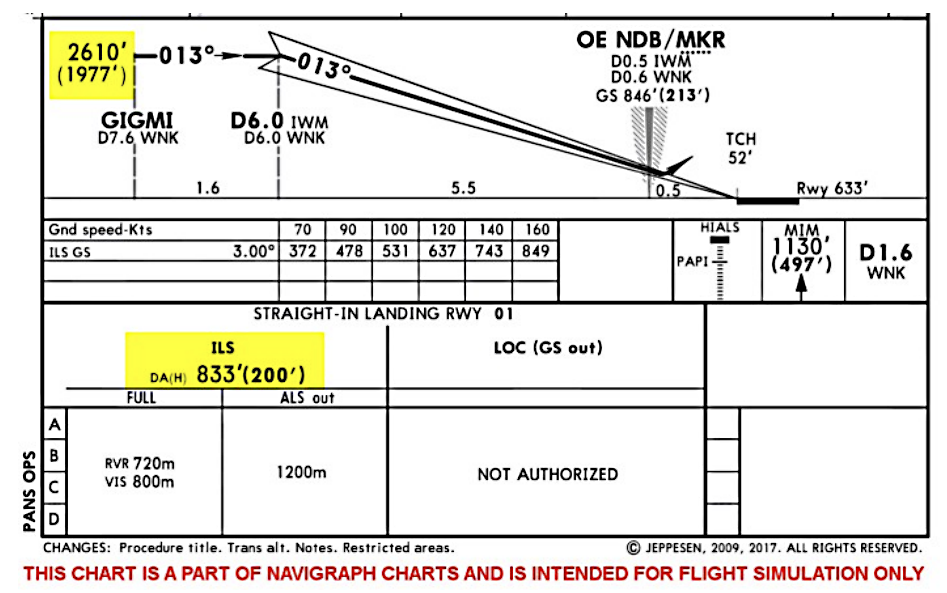
The missed approach will lead the aircraft again to 600 meters QFE which equals approx. 2700 feet QNH.
So you can see, that the procedures itself is not that complicated. You just need to do the conversion calculation from QFE to QNH and be carefull about the altimeter settings.
Now we have a look at the Flight Factor A320, where you can actually select the QFE value on the FCU.
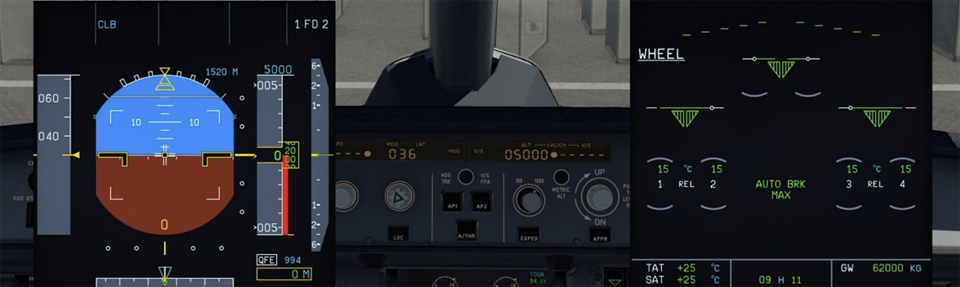
As soon as you select QFE, you need to also set the current QFE value. In this case 994 hPa. On the PFD you will see the following:
Above the Altitude Scale you have the FCU selected Altitude in feet (5000) and left of that the corresponding Meter value (1520 Meters).
Below the Altitude Scale you have the QFE setting indication (994 hPa) and the QFE Meter value (0 feet). The big difference now is, that you enter the QFE feet values in the FCU. I.e. 600 Meters QFE equals 2000 feet QFE (1977 feet to be exact) and is entered in the Altitude Window.
During the Glideslope intercept, you will see the following:
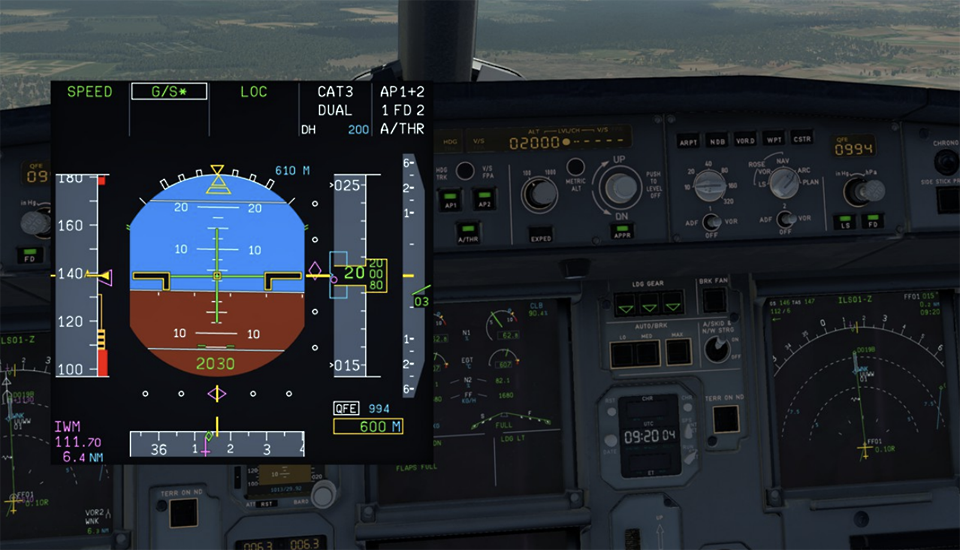
Looking at the PFD we can see the selected Altitude 2000 [ft] and 610 [m] (above Altitude scale) and QFE 994 and the actual altitude in [m] QFE (600).
Again, not that complicated. You just need to be carefull on which settings you enter in the FCU.
Video-Tutorial
This flight was recorded on Twitch, flying from St.Petersburg/ULLI to Moskow Sheremetyevo/UUEE using the new voice codec on VATSIM. The approach into UUEE was flown with the QFE setting procedure, especially when flying the FSLabs A320-X.
Warning
Please use these documents and tools only for flightsimulation!